
Based on the first two posts in this series: Crossplane Is Not Terraform in Kubernetes and the follow-up on pipelines.
At KCD Indonesia 2026 I gave a talk called From Terraform to Crossplane. This post is the whole story of the talk. The short version: Terraform runs and forgets, Crossplane never stops watching. The first post in this series made that point, so I will not argue it again here. I wrote it for people who run Terraform and Kubernetes every day and want to see what changes when the cloud joins the cluster.
What Terraform does, and what it does not #
What does Terraform actually do when you run apply?
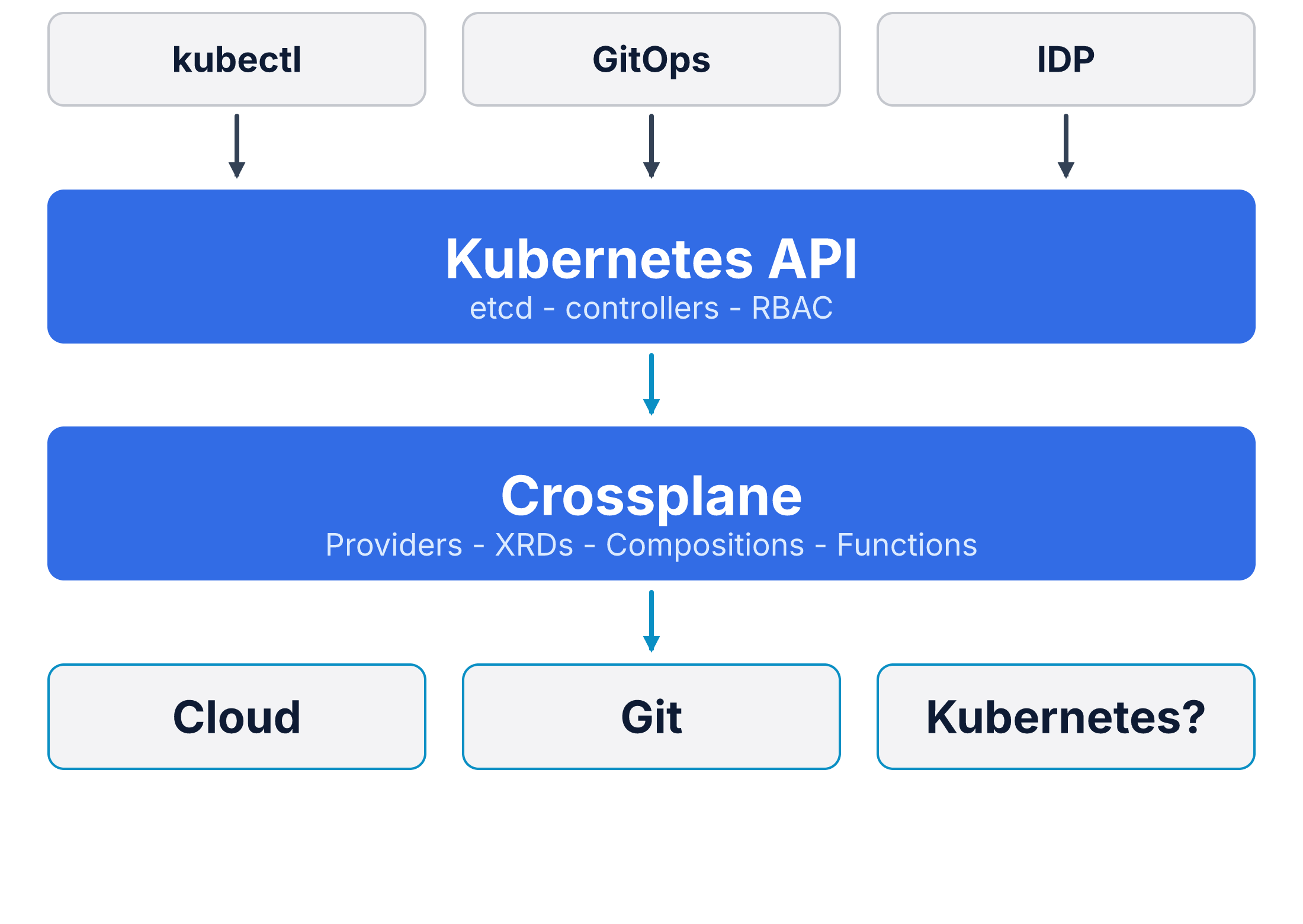
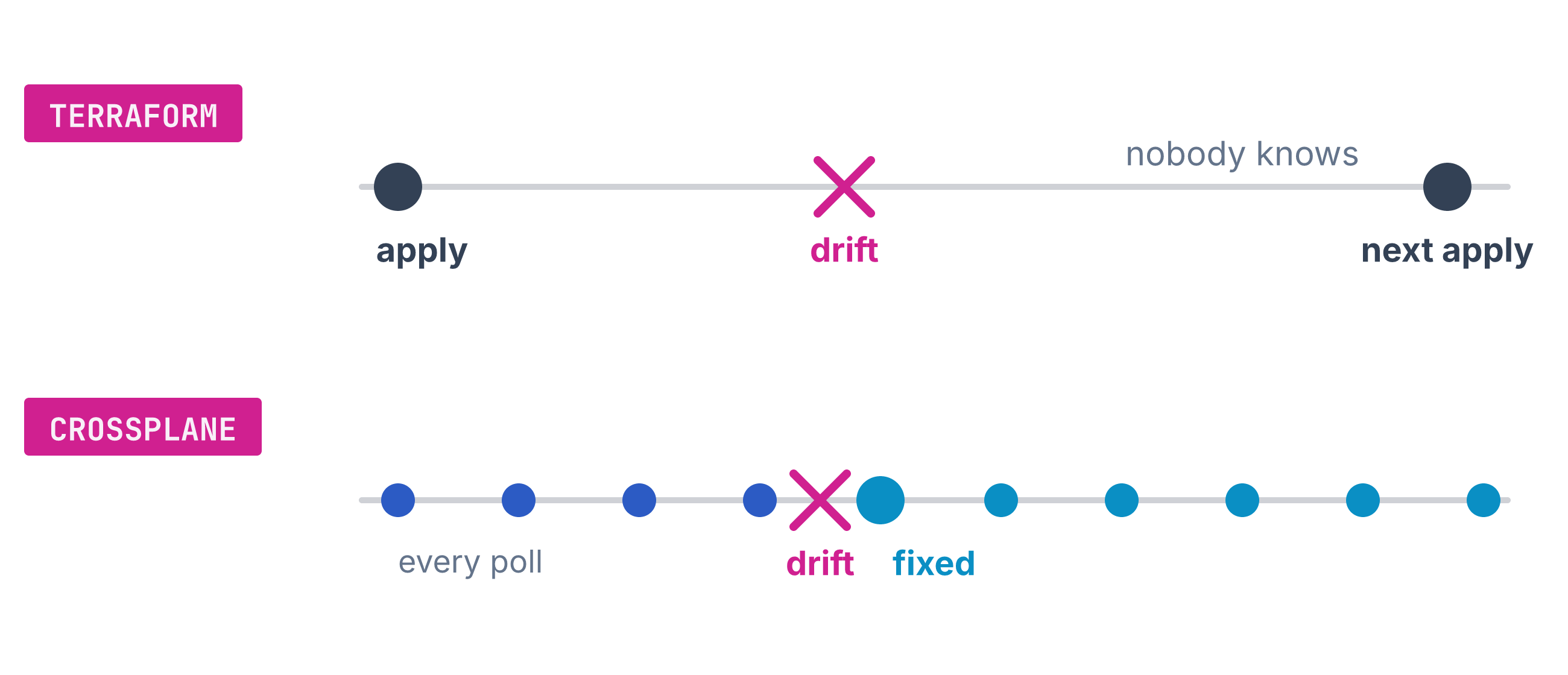
It reads the real world, changes it to match your code, writes a state file, and exits. The state file is where Terraform records what it created. A line from the Crossplane blog has stuck with me: Terraform is a command-line tool, an interface to control planes.1 A control plane is software that keeps a system at the state you declare. When the run ends, the process is gone, and nothing keeps watching.
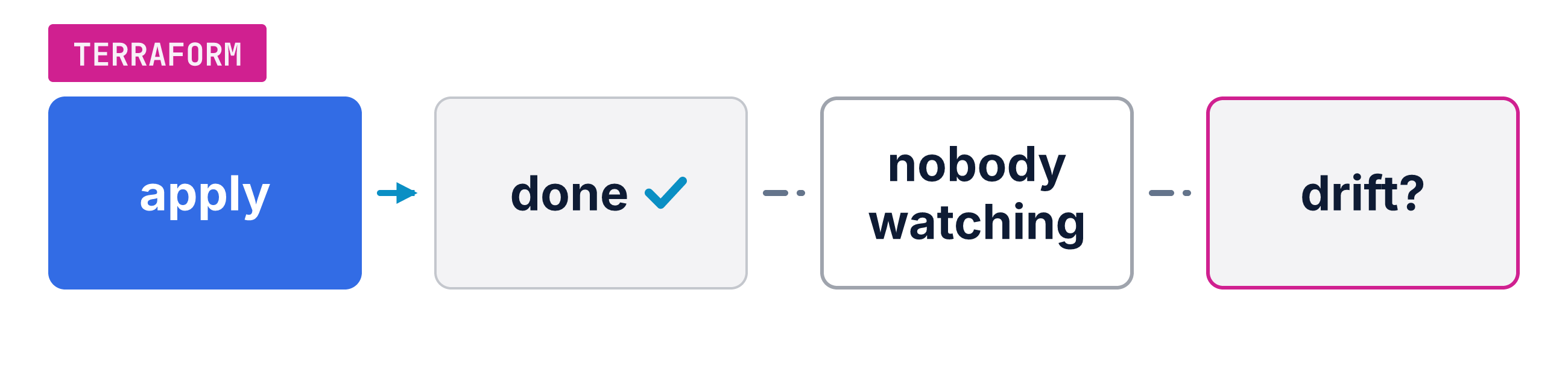
Why is exiting a problem?
Drift is the state where the real world no longer matches the code. Nobody watches after the process is gone, so drift stays invisible until the next plan. Terraform relies on one monolithic state file, and it must hold a lock on that file while a run applies.1 Say someone edits that bucket by hand tomorrow. Terraform finds out only when a person or a pipeline runs plan again.
The rest of this post is the road from that exit to a loop that never stops.
The loop that Kubernetes runs for you #
So what is a control loop, in plain words?
Kubernetes is a control plane. It runs a control loop: read the state you asked for, compare it with the real state, and act to close the gap, forever. A thermostat works the same way. You set 21 degrees. The room sits at 25. The number you set is the desired state, and the room temperature is the current state.2 The thermostat acts to bring the room closer to the number you set.2 It never stops asking. Change the number, and the room follows it back. It cools, checks, and cools again. The docs call this “a non-terminating loop that regulates the state of a system”.2 The docs say the loops “watch the state of your cluster, then make or request changes where needed”.2 Each loop tries to move the real cluster closer to the state you asked for.2 A machine keeps asking, so you do not have to. A sunny day, a crowd of people, an open window. The loop does not care why the room got warm. It sees a difference and closes it.
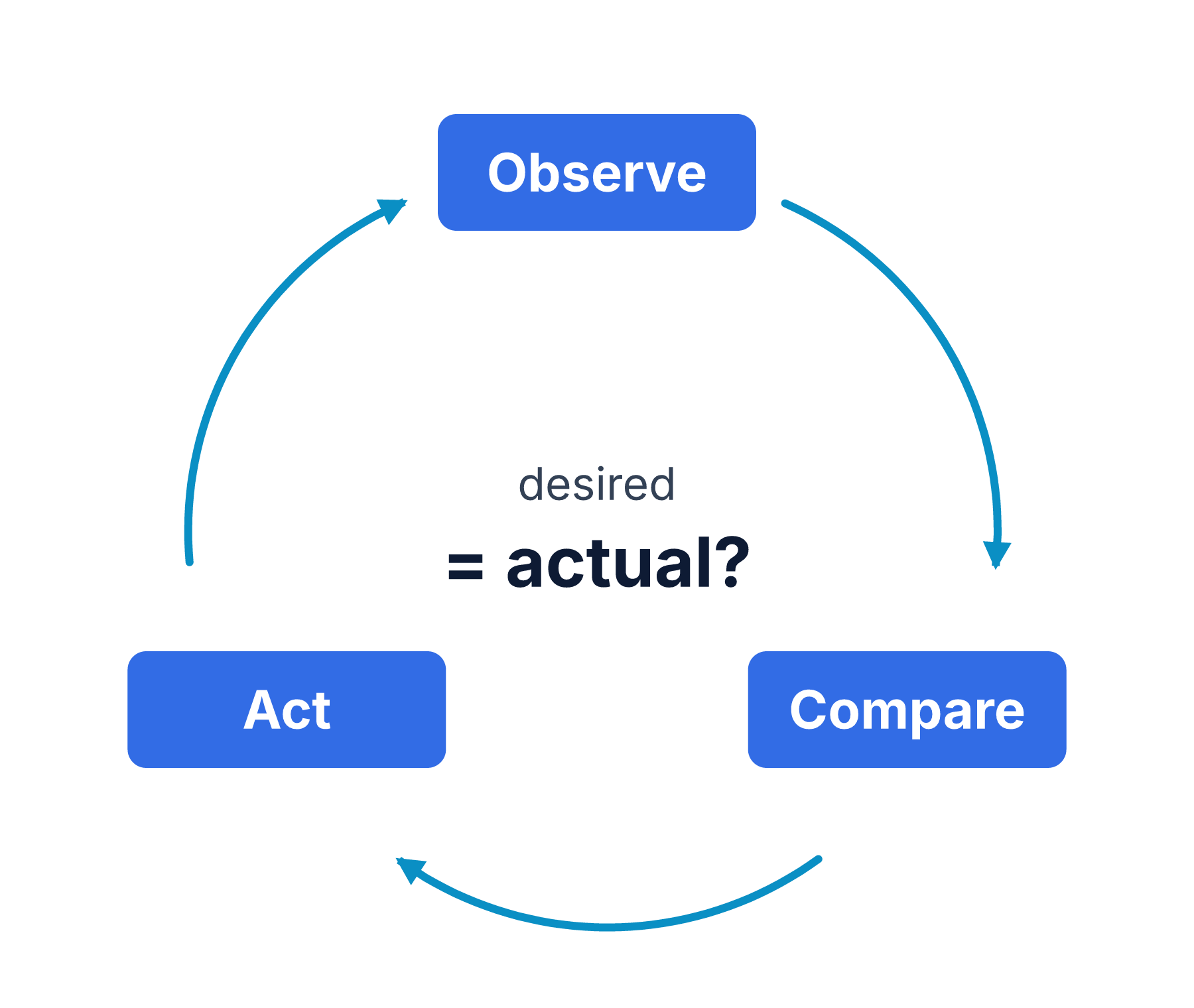
Where does Kubernetes write down what I want and what I have?
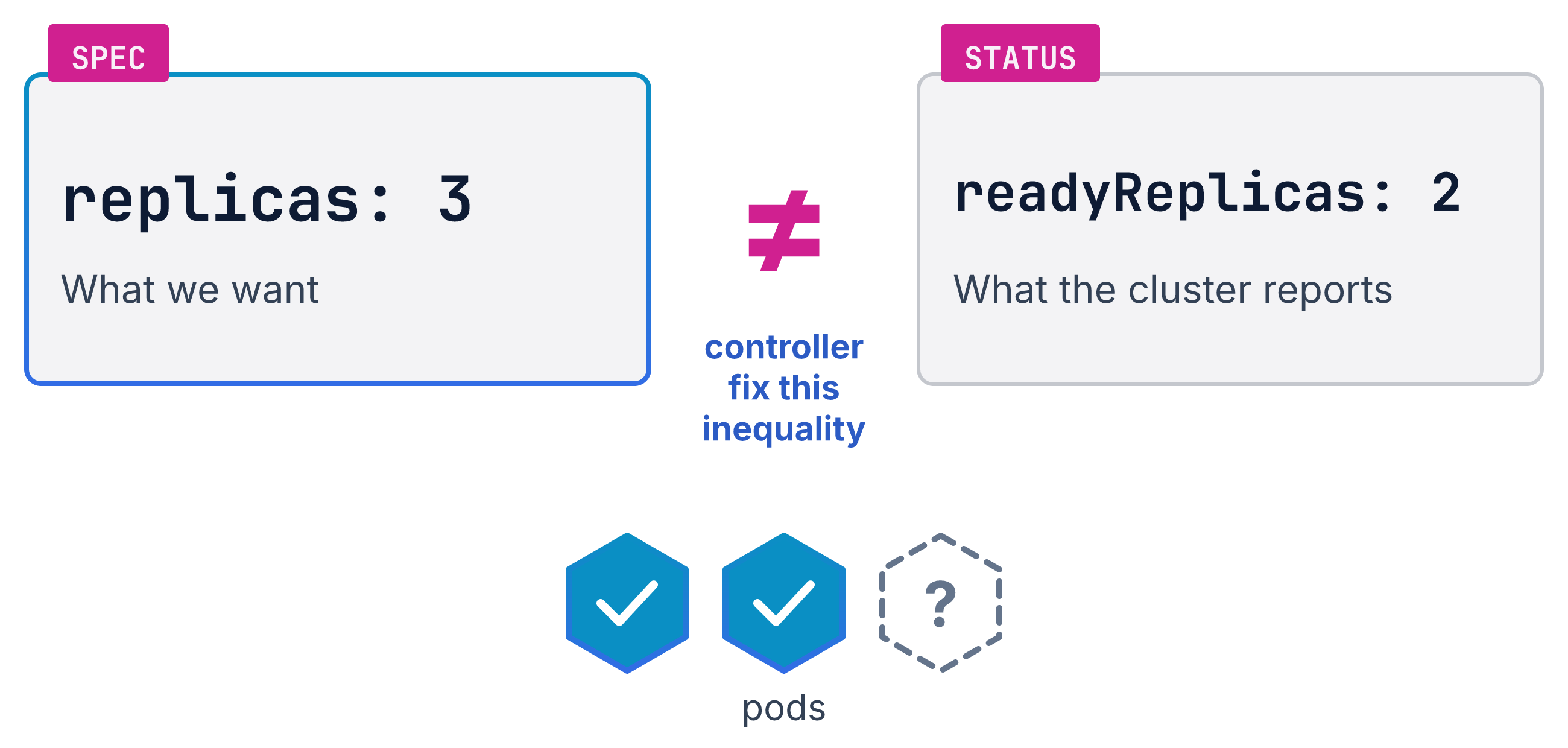
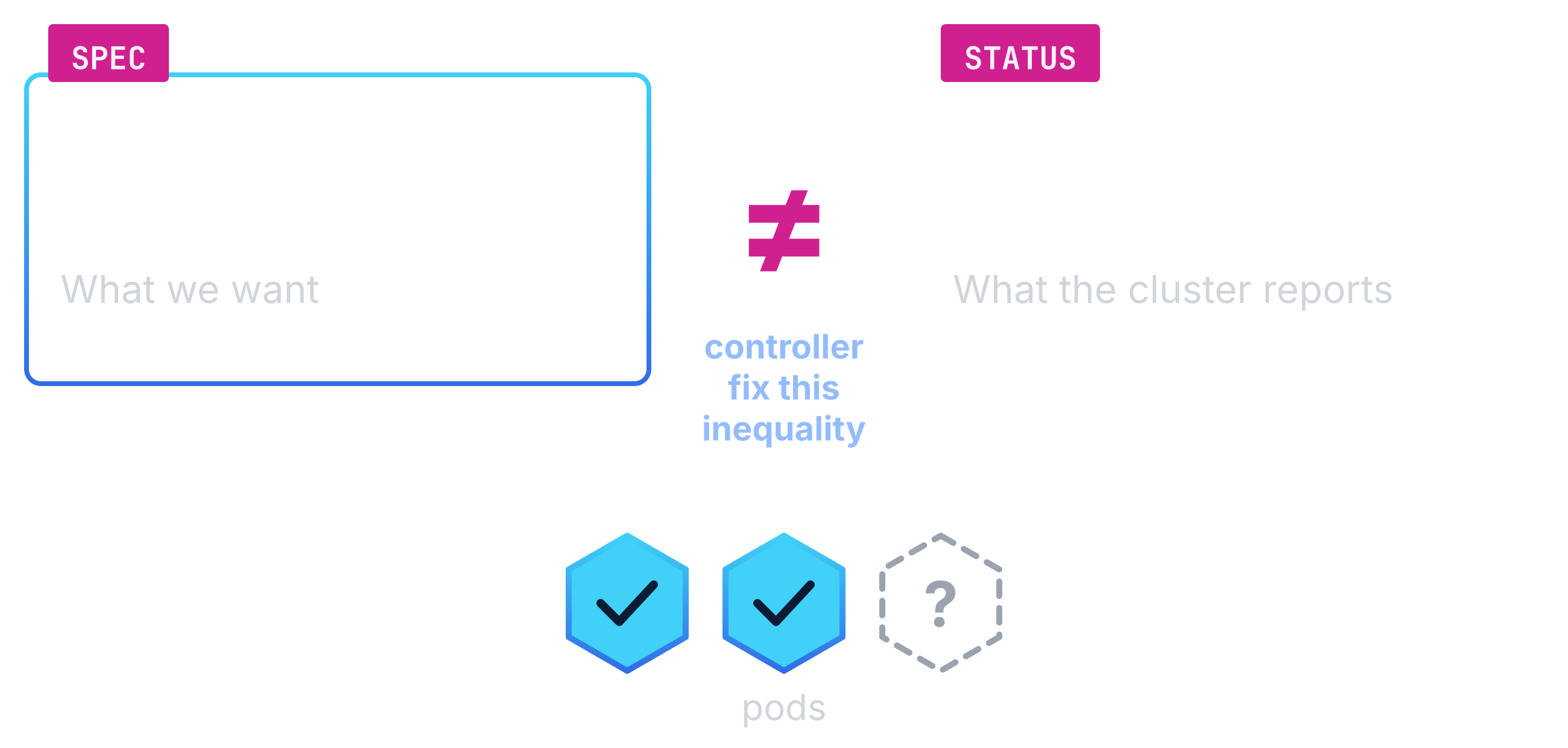
In objects. Every object has two halves. Kubernetes calls each object a “record of intent”.3 The spec is the part of an object where you write what you want. The status is the part where the cluster reports what it sees.3 You write the first. The system updates the second.3 The gap between them is the to-do list of the controller. A controller is a control loop inside Kubernetes that watches one kind of object.2 A loop for pods, a loop for nodes, and one for each kind the cluster knows.2 The control plane “continually and actively manages every object’s actual state to match the desired state you supplied”.3 A spec can ask for three replicas of a pod. The status reports two. The loop creates the third. That is why a deleted pod comes back with no command from you. When the two halves match, the list is empty, and the loop goes back to watching.
Does a controller have to manage pods?
No. The Kubernetes docs describe controllers that read desired state from the API server and then talk directly to an external system.2 Nothing in that wording limits the external system to pods, so it can be an S3 bucket. You do not log into a bucket. You call its API. A program can make that call around the clock. The intent lives in the cluster, and a controller calls the cloud API for you. Same loop, same tools, and that is Crossplane. That sentence is the door to everything else in this talk.
Pointing the loop at your cloud #
What does Crossplane add to my cluster?
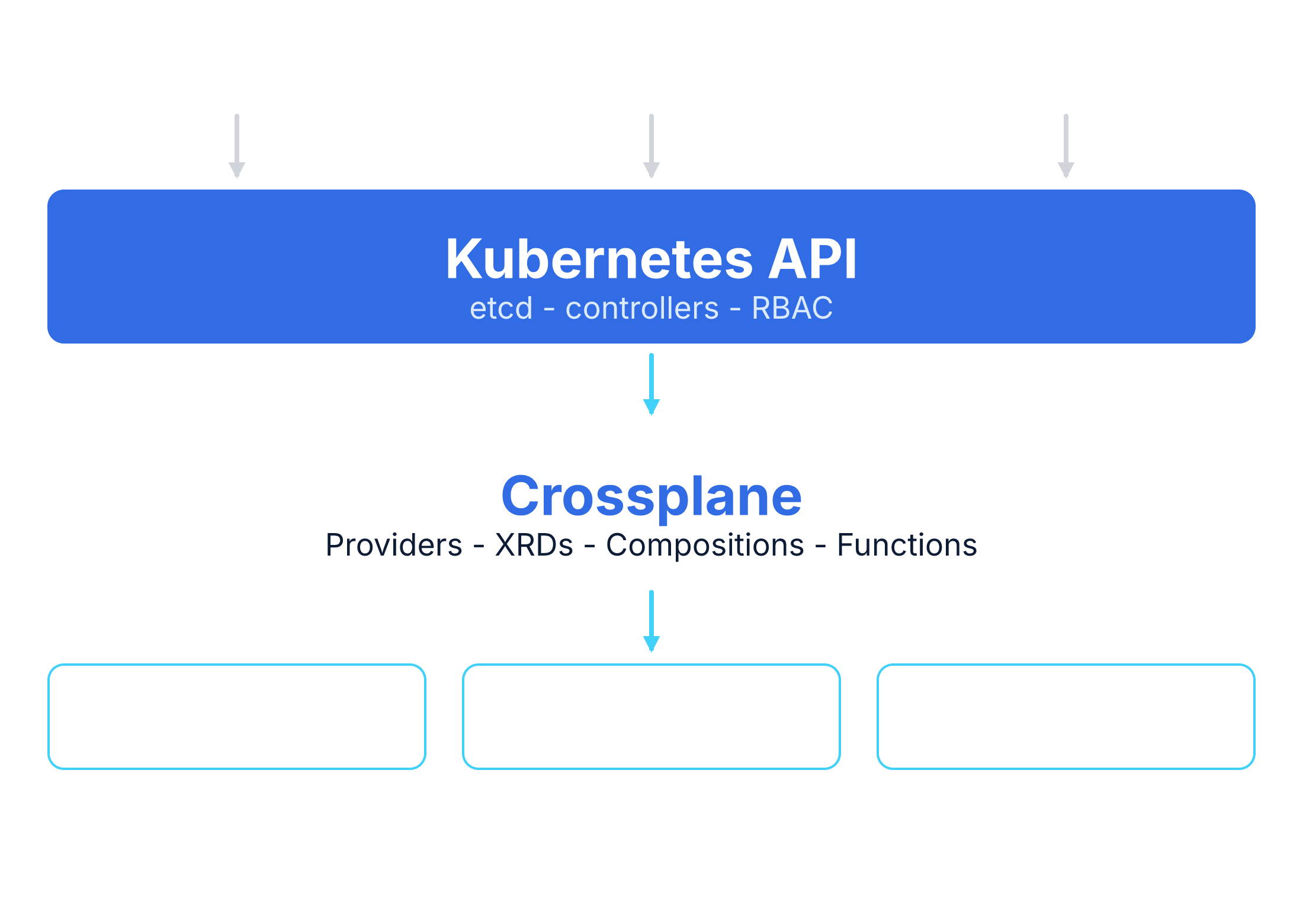
Crossplane installs into the cluster you run today.4 Providers are packages that add new Kubernetes APIs and map them to the API of one cloud.5 Install a provider, and the cluster gains a new API to watch and to change.5 Crossplane is a control plane framework that builds on Kubernetes.4 Your tools keep working: kubectl, GitOps, RBAC, audit logs.4 Four building blocks make up the framework.4 One composes resources, one manages each piece, one runs operations, one handles packages.4 Many Crossplane providers come from Upjet, a project that transforms Terraform providers into Crossplane providers.6 At runtime, its controllers reuse the resource logic of Terraform and expose a plain Kubernetes API.6 The AWS provider in this talk is one of them.6
What does one resource look like on both sides?
A Terraform resource block and a Crossplane managed resource (MR) describe the same bucket.7
The MR is a Kubernetes object with conditions.7
A managed resource (MR) is a Kubernetes object that stands for one piece of a cloud service.7
The Kubernetes object is the managed resource, and the thing in the cloud is the external resource.7
Synced means the provider is watching the resource.7
Ready means the resource exists and you can use it.7
When reconciliation fails, Synced drops to False with a reason.7
The reason reads ReconcileError or ReconcilePaused.7
Run kubectl get and the two conditions appear as columns: NAME, SYNCED, READY, EXTERNAL-NAME, AGE.7
The first two columns are the two conditions.7
The docs use this exact Bucket as their example, so the file below invents nothing.7
Namespaced means the object lives inside one namespace, the Kubernetes way to split a cluster between teams.8
In v2 every MR sits in a namespace.8
The API group carries .m. for the modern namespaced form.8
The docs mark the old cluster-wide group as deprecated, on its way to removal.8
The Terraform side of slide 07, code/main.tf:9
module "bucket" {
  source      = "./modules/s3-bucket"
  bucket_name = "kcd-demo-alpha"
  region      = "us-east-1"
  versioning  = "Enabled"
}
The Crossplane side, code/managed-resource.yaml:10
apiVersion: s3.aws.m.upbound.io/v1beta1
kind: Bucket
metadata:
  name: kcd-demo-raw
  namespace: aws
spec:
  forProvider:
    region: us-east-1
Same bucket, two shapes.
The two files ask for one bucket in us-east-1.
The module call sets three inputs: the bucket name, the region, and the versioning choice.
The object shows a name, a namespace, and a region under spec.forProvider.
The namespace aws is the namespaced rule at work.
The docs call that field block the source of truth for the external resource.7
Crossplane overrides changes made outside Crossplane.7
Who notices drift now?
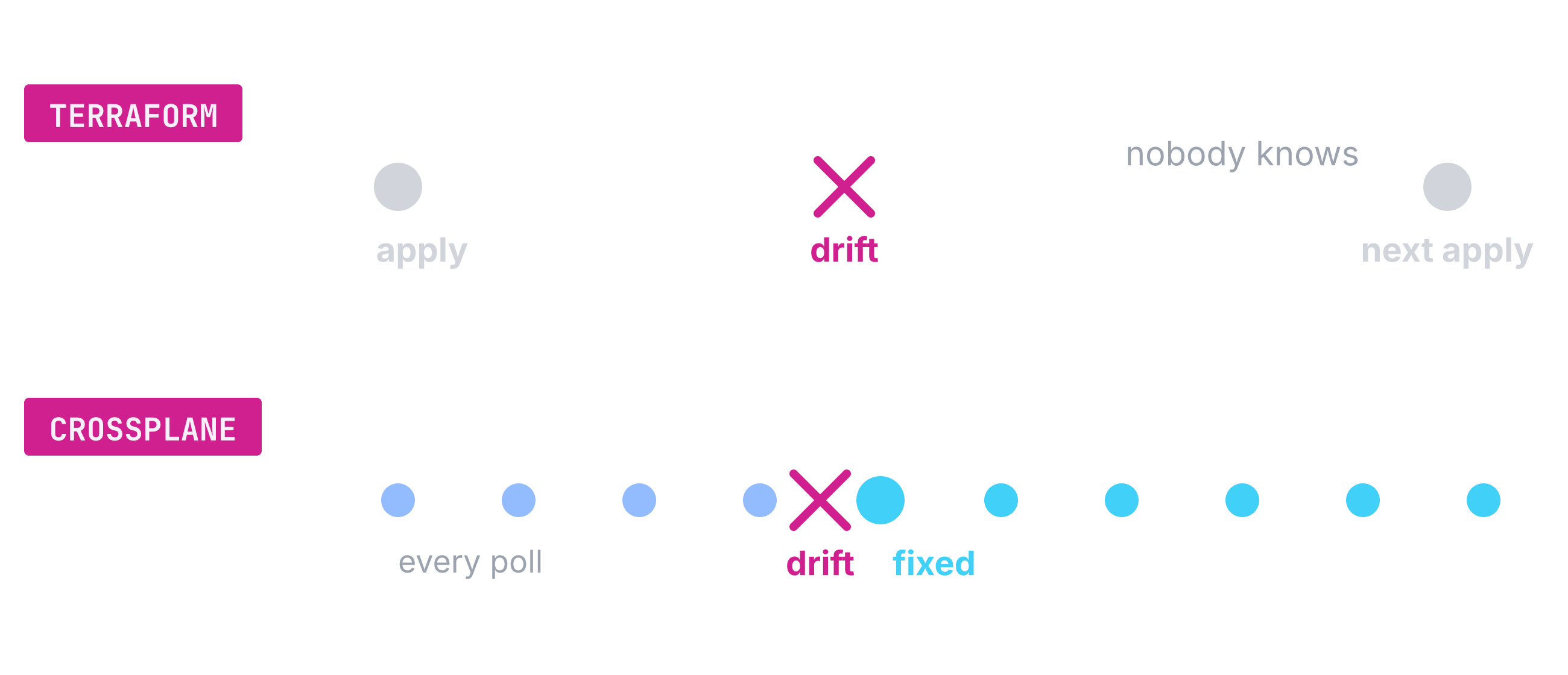
The provider re-checks every MR on a poll and fixes what no longer matches.
This is the loop from the last section, now aimed at one cloud.
The docs describe the check.7
The provider looks up the resource, and if it cannot find it, it creates it.7
Alongside the poll, the provider runs a full re-sync every hour.11
An annotation on one MR, crossplane.io/poll-interval, can change that cadence.7
A command-line tool cannot watch anything after it exits.1
Terraform finds the same drift only at the next plan, or when the next person runs one.1
Until then, the bucket can sit changed for days, and nobody hears about it.1
But a real bucket is never only one resource, and that is where the talk turned.
One small object, a whole stack #
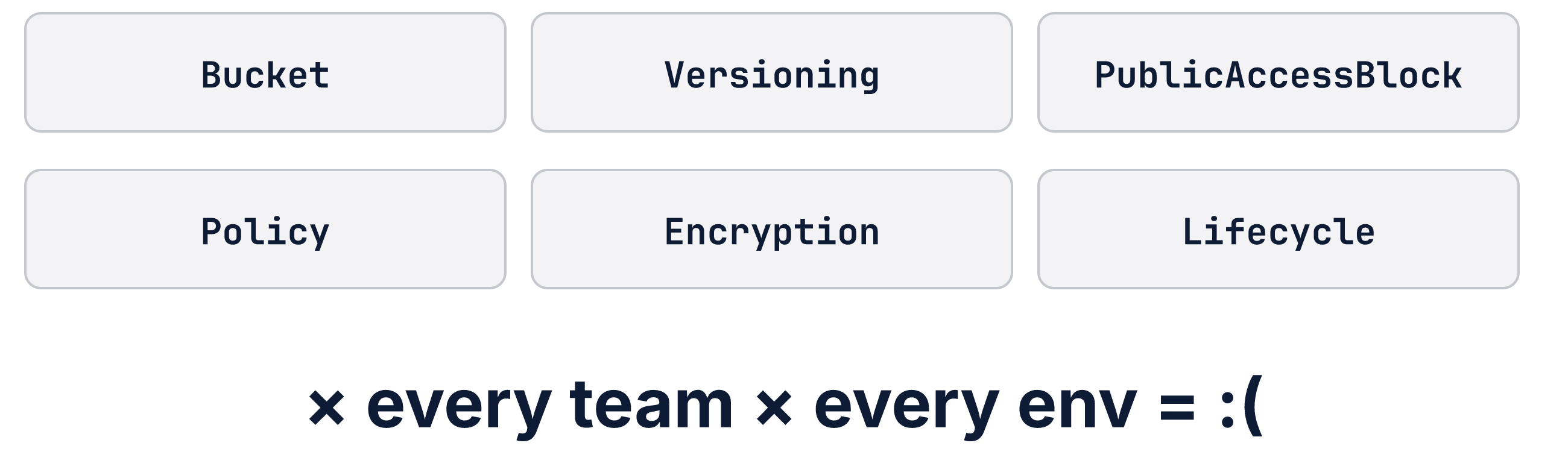
Why is one secure bucket never one resource?
A bucket fit for a platform needs versioning, a public access block, and more, each one a managed resource, multiplied by teams and environments. Each team and each environment needs its own copy of that pile, a copy you write by hand and keep in sync. The talk’s pipeline builds three managed resources: a bucket, a versioning object, and a public access block.12 The recorded demo ran a fuller pipeline: ownership controls and server-side encryption join the same three, five children in all.13 The figure below shows only what one hardened bucket needs.

How do I hide that pile behind one small thing?
You write an XRD, a schema for your own API, and Crossplane turns it into a CRD that kubectl can list.
A CRD is the Kubernetes object that registers a new API type.
When you apply the XRD, Crossplane creates a matching CRD for it.14
From then on, kubectl get lists the new kind like it lists pods.
The pile does not disappear, but it hides behind one small API of your own.
The schema inside is plain OpenAPI v3, one schema per version, the schema language Kubernetes CRDs use.14
Ours sets the scope to Namespaced, which is the default in v2.14
It defines three fields: bucketName, region, and versioning, and versioning starts as Suspended unless you say otherwise.15
Our XRD, code/xrd.yaml:
apiVersion: apiextensions.crossplane.io/v2
kind: CompositeResourceDefinition
metadata:
  name: xs3buckets.aws.example.org
spec:
  scope: Namespaced
  group: aws.example.org
  names:
    kind: XS3Bucket
    plural: xs3buckets
  versions:
    - name: v1alpha1
      served: true
      referenceable: true
      schema:
        openAPIV3Schema:
          type: object
          properties:
            spec:
              type: object
              required: [bucketName, region]
              properties:
                bucketName:
                  type: string
                region:
                  type: string
                versioning:
                  type: object
                  default: {}
                  properties:
                    status:
                      type: string
                      enum: [Enabled, Suspended]
                      default: Suspended
What does the app team write, then?
A small object called a composite resource (XR): a name, a namespace, and the three fields the XRD defined. An XR is an instance of the API that an XRD creates. It looks like any other Kubernetes object, because it is one. In v2 the XR can be namespaced, so it lives beside the workloads of one team. Claims were the old v1 wrapper objects around an XR. For namespaced XRs they are gone, because there is no longer a need for them.8 The official Crossplane blog describes the same idea: each XR is exposed as an API endpoint of its own.1 Ours is named demo-alpha and lives in the namespace aws.16 It sets bucketName to kcd-demo-alpha, region to us-east-1, and versioning to Enabled.
What the app team writes, code/xr.yaml:
apiVersion: aws.example.org/v1alpha1
kind: XS3Bucket
metadata:
  name: demo-alpha
  namespace: aws
spec:
  bucketName: kcd-demo-alpha
  region: us-east-1
  versioning:
    status: Enabled
And what turns that small object into real resources?
The pipeline of the Composition: a go-template function renders the managed resources, and the auto-ready function marks the XR Ready when its children are ready. A Composition is a pipeline of functions that says what to build for an XR. A function is a small server that turns the spec of an XR into the resources it needs.
The docs describe a Composition as a template for creating several Kubernetes resources as one composite resource.17 Crossplane calls the functions of the pipeline in order. Each function gets the observed state and the step input, and returns its desired state. The desired state of the last one wins, and Crossplane applies it to the cluster.17 In v2 this pipeline is also the only pattern, because the old built-in patch-and-transform is gone.
The first step of our pipeline runs function-go-templating.
Its input is a Go template with the same {{ }} syntax as Helm, and the helper setResourceNameAnnotation gives each child a stable name.18
The template reads the spec of the XR through .observed.composite.resource.18
So bucketName and region flow straight from the XR into the resources.
The head of our pipeline file shows that step.19
The head of the pipeline, code/composition.yaml:
  mode: Pipeline
  pipeline:
    - step: render
      functionRef:
        name: function-go-templating
      input:
        apiVersion: gotemplating.fn.crossplane.io/v1beta1
        kind: GoTemplate
        source: Inline
        inline:
          template: |
            {{- $spec := .observed.composite.resource.spec }}
            {{- $versioning := default (dict) $spec.versioning }}
            ---
            apiVersion: s3.aws.m.upbound.io/v1beta1
            kind: Bucket
            metadata:
              name: {{ $spec.bucketName }}
              annotations:
                {{ setResourceNameAnnotation "bucket" }}
            spec:
              forProvider:
                region: {{ $spec.region }}
              providerConfigRef:
                name: default
                kind: ClusterProviderConfig
A second step runs function-auto-ready, which marks the XR Ready when all composed resources are ready.17 The template carries no readiness logic, because the function handles readiness for it.
You can try the whole pipeline before anything reaches a cluster.
Run crossplane render xr.yaml composition.yaml functions.yaml on your laptop.
The three arguments are the small object, the pipeline, and the list of functions.
The command prints the resources the pipeline creates for your object.
Docker runs the functions, and no cluster is needed.
You can test template changes this way before anyone applies anything.
The v2.4 docs spell the same command crossplane composition render.20
My local run of that command produced code/rendered.yaml.
The output lists the three children and reports Ready False with the message Unready resources: bucket, pab, and versioning.12
Nothing on a laptop can fulfill the resources, so the offline result stops at Creating.
Those names come from the setResourceNameAnnotation calls in the pipeline file.
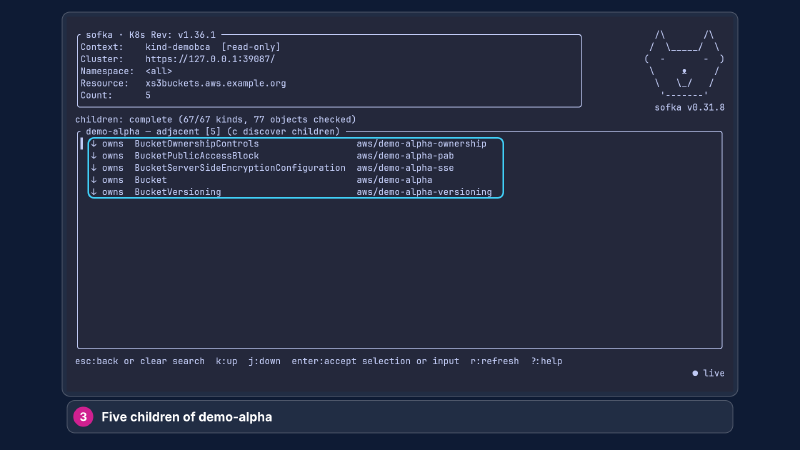
One small object in, five managed resources out, and every one of them reports its own status. The next section is the map for people who think in Terraform modules.
If you think in Terraform modules #
If I think in Terraform modules, what is the map?
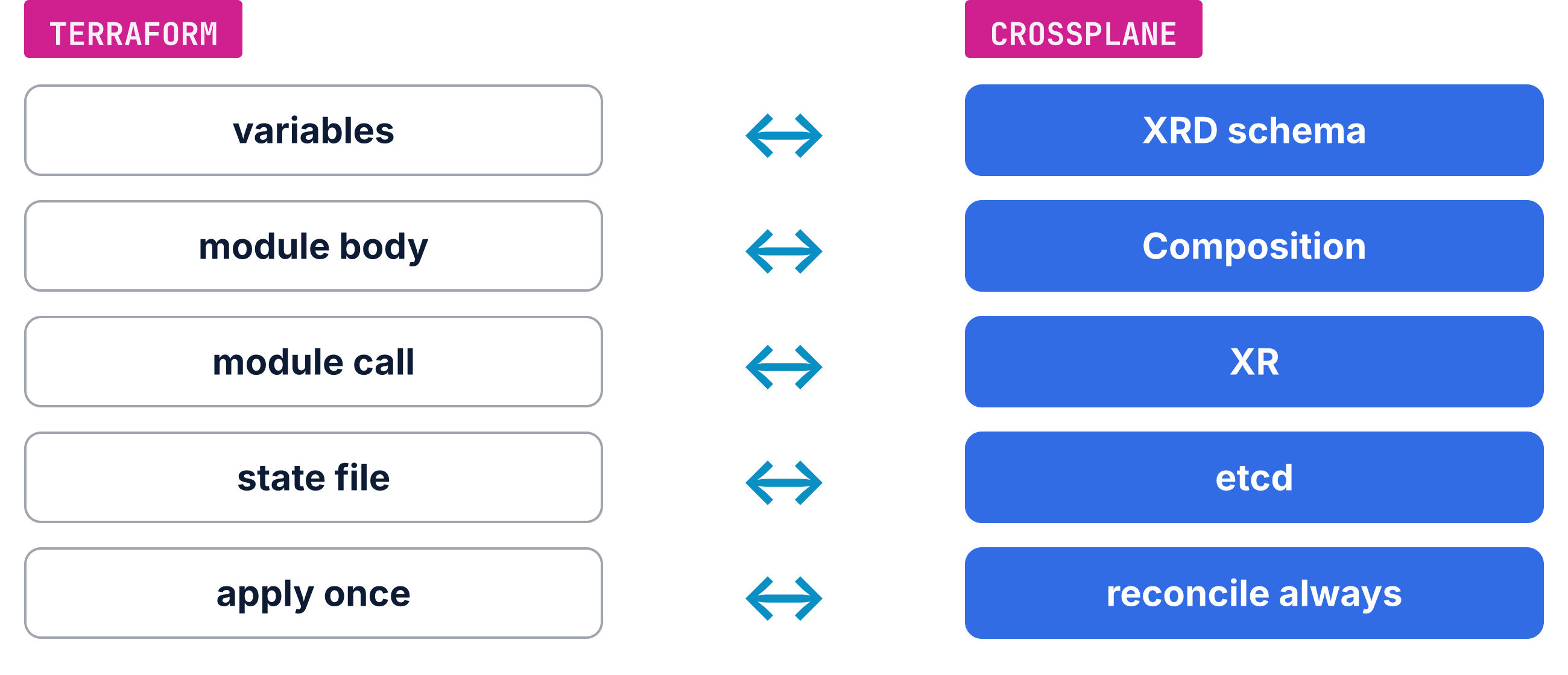
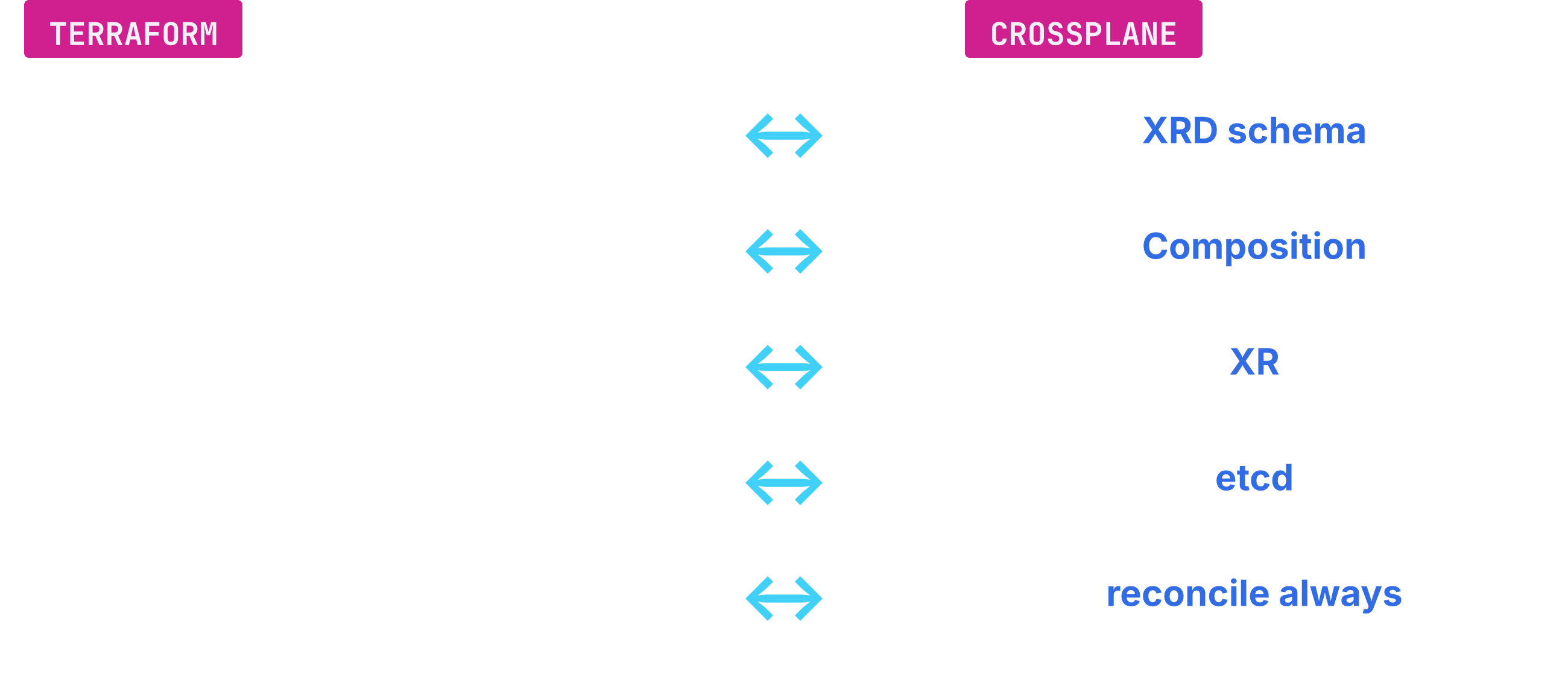
Think of it as variables becoming the XRD schema and the module body becoming the Composition. The module call becomes an XR, the state file becomes etcd, and apply once becomes reconcile always. Our bucket XRD carries bucketName, region, and versioning, and those three play the variable role. In the same spirit, the module body lists the resources each call creates.
Etcd is the database where Kubernetes stores object state. Crossplane writes the state record there through an unmodified API server.21 One warning: the mapping is only our analogy.
The official Crossplane blog says the module equivalent is an XR, exposed as an API endpoint.1 The blog owns that claim. Terraform raises configuration abstraction without raising access control, and an XR gives you a normal namespaced API, so Kubernetes RBAC applies.1
That, to me, is the bigger idea hiding in the map.
What do you gain, and what do you pay?
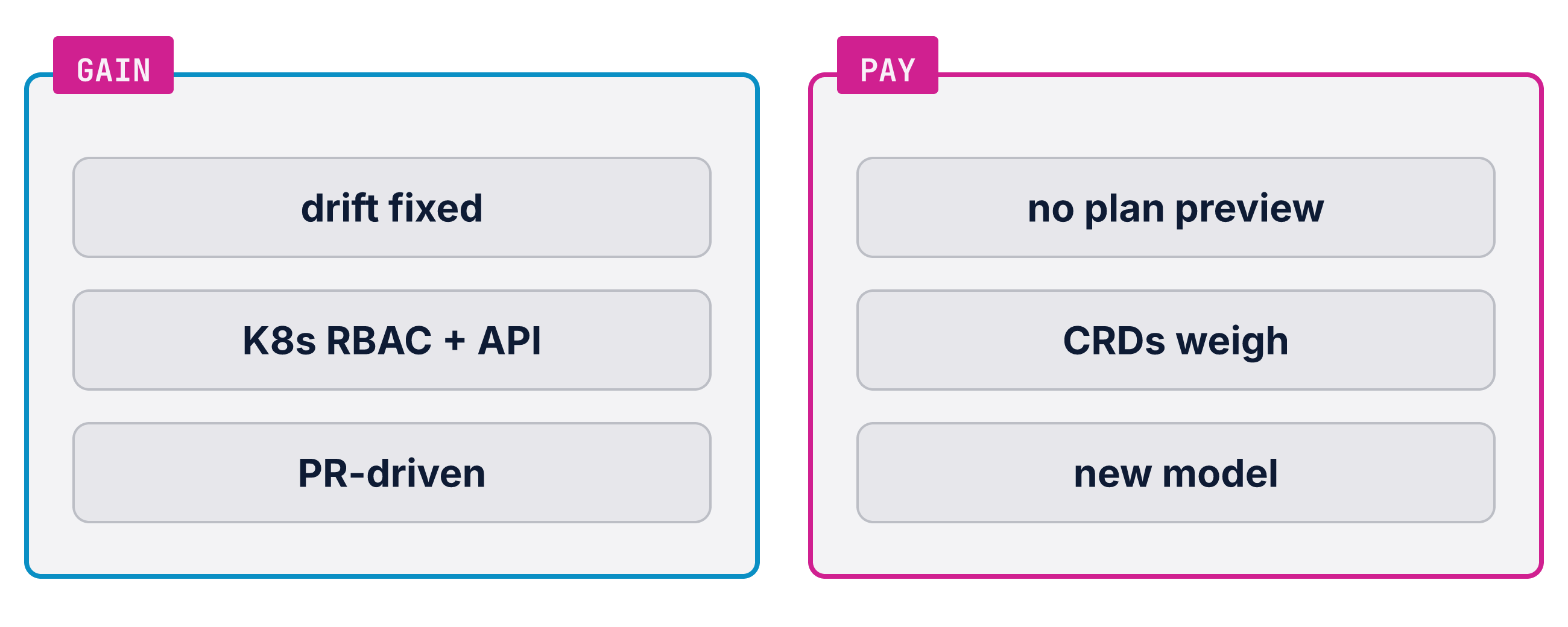
You gain a loop that fixes drift, Kubernetes RBAC and tooling, and a PR-driven flow. You pay with no plan preview, real memory cost for CRDs, and a new model to learn. Drift gets fixed without a person running anything, changes arrive as pull requests, and Kubernetes permissions decide who changes what. Those gains came from the last three sections, so let me price the costs.
The missing plan preview is the honest cost: cloud APIs mostly have no dry-run to call.22 That absence shapes how teams review. Two issues track the request. Crossplane issue 1805 has been open since 2020, and issue 5477 is the most upvoted one.22
The memory cost is concrete. A big provider on a small cluster pays for types it never calls. Each CRD takes about 3 MiB of API server memory, and large providers have 100+.23
Managed resource definitions (MRD) are the answer here. MRDs tell Crossplane to skip the CRDs you do not use.24 You enable only the kinds your platform needs.
The third cost is in my opinion the heaviest one: a new model to learn. Terraform muscle memory does not transfer with it. A quieter gap is breadth: the Terraform registry still covers more ground than the Crossplane side. Two tools sit in that space. If you want to keep Terraform, tofu-controller plans and waits for approval, and Atlantis runs plan or apply from PR comments.25 Used that way, Terraform stays a fine tool.
The last part of the talk wrapped this engine in something developers already know how to open.
A front door made of pull requests #
How does a change travel from a browser to a bucket?
A form in Backstage opens a pull request, a human merges it, Argo CD syncs it, and Crossplane builds the resources. Backstage is the developer portal where teams ask for infrastructure by form. Argo CD is the GitOps controller that copies what is in Git into the cluster. Four tools, one path: form, pull request, sync, build.
The Kubernetes ingestor plugin generates the form from the XRD, so nobody maintains it by hand. It turns every XRD into a template and registers it in the catalog.26
The template shows the three fields the XRD defined, and the scaffolder writes the YAML from the answers.26
The developer never touches the cluster in this flow.
Submitting runs a scaffolder step that generates the YAML, and a publish step opens the pull request on the demo repo. The branch name carries the name of the new resource.26
In the demo, a root application wires three ApplicationSets, one each for providers, modules, and resources, into Argo CD. The resources application watches the manifest folder and syncs it automatically, and Crossplane builds what the manifest asks for.13
The demo also follows the Crossplane guide for the Argo CD side. That guide asks for annotation based resource tracking, a health mapping for Crossplane kinds, and one exclusion for an internal kind. With them, Argo CD can read the health of the new kinds as well.27
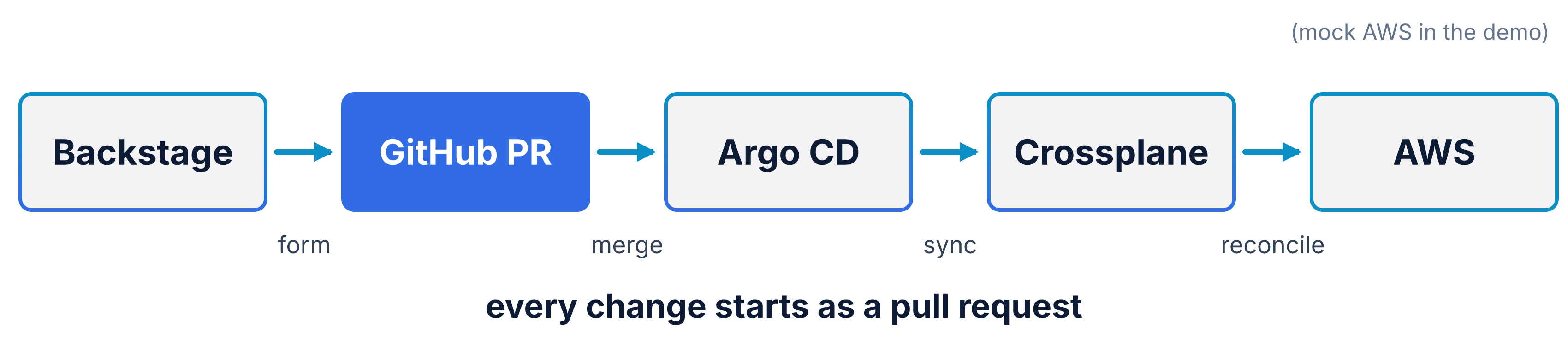
What does that look like, step by step?
In the recorded demo I created a bucket named kcd-demo-gamma, and every step left a trail. The trail runs from a browser, through Git, into the cluster, and out to the mock cloud.13
The demo runs Crossplane 2.3.1, provider-aws v2.6.3, and function-go-templating v0.12.1.13 Those minor versions are older than the v2.4 docs I cite above.
Ministack is a local mock of AWS, so the whole story runs on one laptop. A helmfile installs Argo CD, Crossplane, and ministack into one Kubernetes cluster, and no real cloud account exists anywhere in this story. The mock answers the same calls a real S3 endpoint answers.13
Seven steps tell the story, six of them as screenshots, and the merge between them leaves no picture.
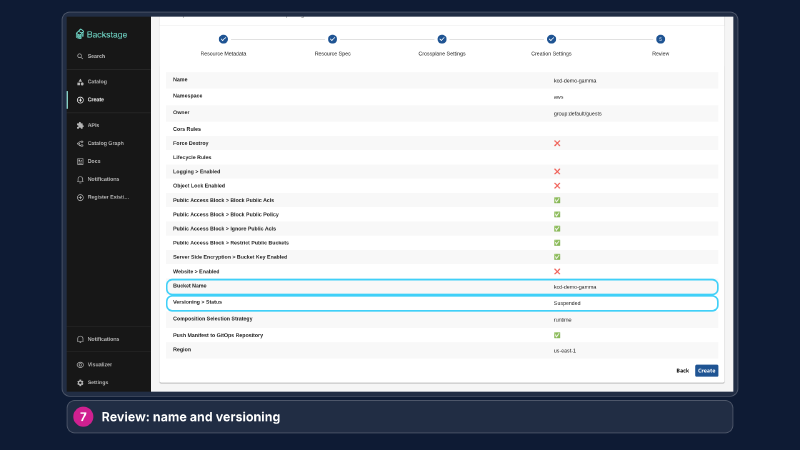
The developer fills the form with the name kcd-demo-gamma, the namespace aws, and versioning set to Suspended. The region field has no default, so it got us-east-1 by hand. The Review step shows every value before anything is created.13
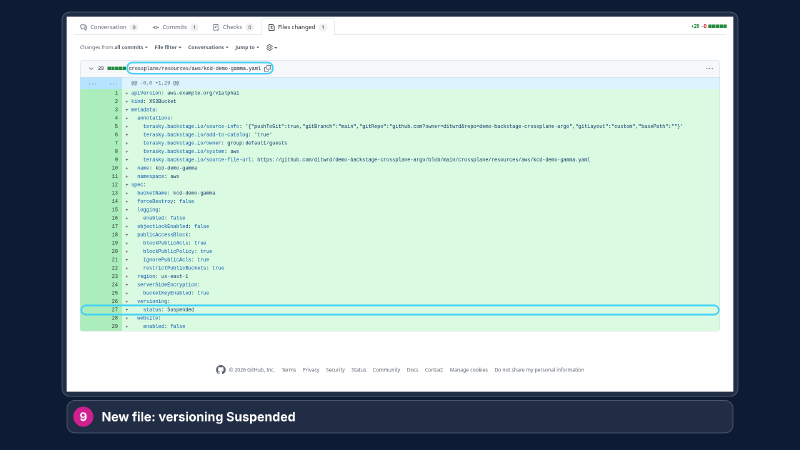
Backstage opened a pull request that adds one file, crossplane/resources/aws/kcd-demo-gamma.yaml. The file holds the whole XR, ready for review.13
A human reviews and merges the pull request.
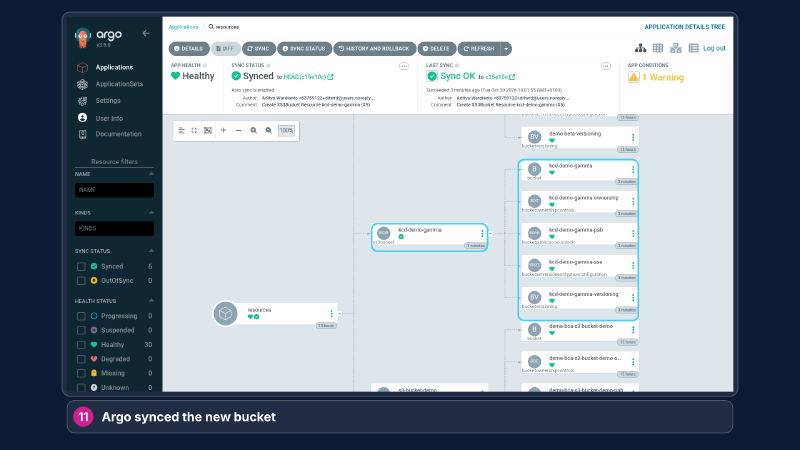
Argo CD syncs the commit, the application goes Healthy, and the new XR appears with its children. The health of the application mirrors the Ready condition of the XR. The whole hop from merge to Ready takes under two minutes.13
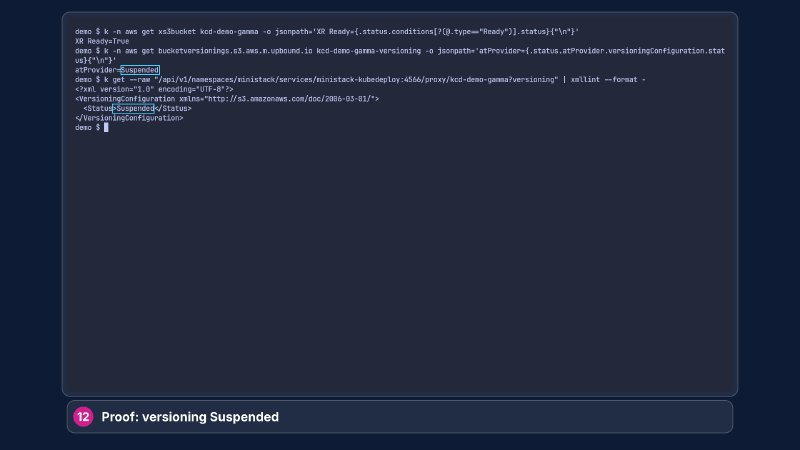
The XR reports Ready while versioning stays Suspended. The same value shows in two places, the Kubernetes object and the mock cloud. A read against the mock AWS confirms <Status>Suspended</Status>.13
And a change to something that already exists?
The same trail runs again. A second form sets versioning to Enabled, a two-line diff shows it, and the mock AWS console confirms it.13
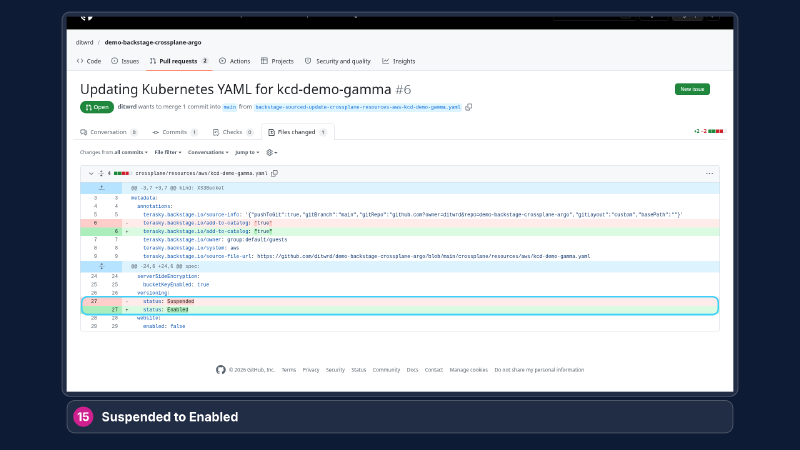
The update form comes prefilled with the current values, so the only change was the versioning select.13
The update pull request turns Suspended into Enabled. The diff shows the same line twice, with the old value above the new.13
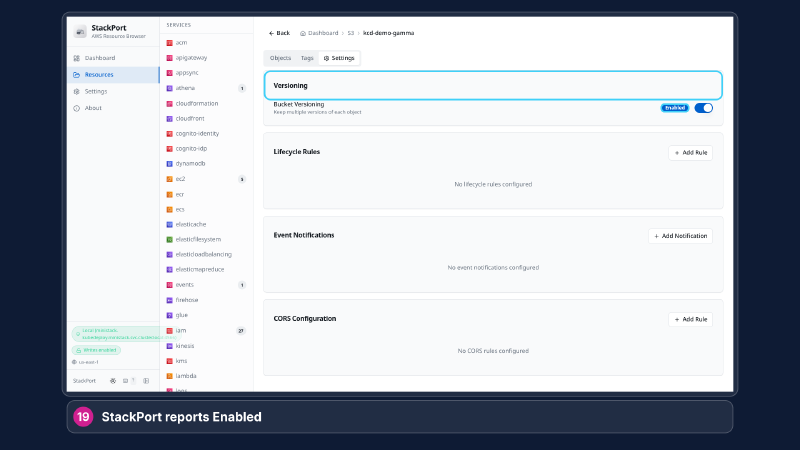
After the sync, the mock AWS resource browser reports Enabled. Same bucket, same card, different badge.13
So what are the three things worth remembering?
A loop beats a run, your own API beats a pile of resources, and a pull request beats a direct apply. The loop keeps watching after the run stops, so drift gets fixed without anyone asking. Your own API means the app team writes one small XR while the Composition builds the managed resources. The pull request door means every change arrives as a diff someone approves.
TL;DR #
A loop beats a run:
- The loop never stops. The provider re-checks every managed resource and fixes drift without a person running anything.
- Your own API. An XRD defines the fields, a Composition builds the resources, and the app team writes one small XR.
- A pull request as the only door. Review, history, and rollback come with the workflow.
Crossplane turns your cloud into Kubernetes APIs, and Terraform stays a fine tool beside it. This is a different bargain.
Next Up #
The next post shows the finished platform: Backstage as the portal, Crossplane as the engine, Argo CD as the delivery pipeline.
Have a good day!
-
Web - Nic Cope - “Crossplane vs Terraform” ↩︎ ↩︎ ↩︎ ↩︎ ↩︎ ↩︎ ↩︎ ↩︎
-
Web - Kubernetes documentation - “Controller” ↩︎ ↩︎ ↩︎ ↩︎ ↩︎ ↩︎ ↩︎ ↩︎
-
Web - Kubernetes documentation - “Working with Kubernetes Objects” ↩︎ ↩︎ ↩︎ ↩︎
-
Web - Crossplane documentation - “What’s Crossplane?” ↩︎ ↩︎ ↩︎ ↩︎ ↩︎
-
Web - Crossplane documentation - “Managed Resources” ↩︎ ↩︎ ↩︎ ↩︎ ↩︎ ↩︎ ↩︎ ↩︎ ↩︎ ↩︎ ↩︎ ↩︎ ↩︎ ↩︎ ↩︎ ↩︎
-
Web - Crossplane documentation - “What’s New” ↩︎ ↩︎ ↩︎ ↩︎ ↩︎
-
File:
code/main.tfin the talk materials. ↩︎ -
File:
code/managed-resource.yamlin the talk materials. ↩︎ -
Web - provider-upjet-aws source - “cmd/provider/s3/zz_main.go” ↩︎
-
Demo repo: ditwrd/demo-backstage-crossplane-argo, public on GitHub. ↩︎ ↩︎ ↩︎ ↩︎ ↩︎ ↩︎ ↩︎ ↩︎ ↩︎ ↩︎ ↩︎ ↩︎ ↩︎
-
Web - Crossplane documentation - “Composite Resource Definitions” ↩︎ ↩︎ ↩︎
-
File:
code/xrd.yamlin the talk materials. ↩︎ -
File:
code/xr.yamlin the talk materials. ↩︎ -
File:
code/composition.yamlin the talk materials. ↩︎ -
Web - Crossplane documentation - “Disabling Unused Managed Resources” ↩︎
-
Web - Crossplane documentation - “Managed Resource Definitions” ↩︎
-
Web - tofu-controller documentation - “Plan and Manually Apply”; Web - Atlantis - “Atlantis” ↩︎
-
Web - Crossplane documentation - “Crossplane with Argo CD” ↩︎